- 腾讯课堂pc端
- 编程猫在线电脑版软件
- 米家摄像机pc端(imi camera)
照片与视频
iLut
iLut
![<?=$ecms_gr[title]?>](https://img.downzn.com/2026/01/27/3f14528d-f421-49.jpg)
图大师
照片与视频 | 18.9MB
图大师是一个很棒的工具,可以轻松地剪切和删除背景。 它还可以通过简单的操作删除不需要的对象。 如果可以修饰照片的一部分或使用许多过滤器调整整张照片。 并且图大师引入了一种新的设计思维导图、流程图、UML 的方法。 您可以保存组合的形状并在将来自己重复使用。 因此,您可以不受限制地设计任何形状。 图大师主要特点: • 剪切和移除背景 • 删除照片中不需要的人或物体 • 修饰照片的一部分 • 使用滤镜调整整张照片 • 设计和保存用于思维导图、流程图、UML 等的形状, 我们将不断改进和完善应用程序,如果您有任何好的建议,您可以在下方留言告诉我们。
照片素描笔PhotoSketcher
照片与视频 | 16.4MB
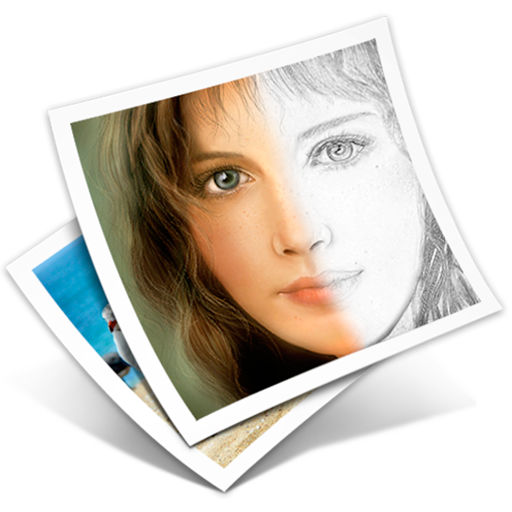
PhotoSketcher是一款能将你的数码照片变成铅笔素描图的小软件。你只需将照片文件拖拽到它的窗口上,魔术般的效果瞬间即现。 主要特点有: - 智能的算法直接可以生成出色的效果,无需繁琐的调整 - 无论照片大小都能够适用 - 素描效果图可按照片原大保存,保持高分辨率 - 支持拷贝和粘贴 - 可以方便的在原图和素描效果图之间切换显示。甚至还可以用分割线将两者同时显示。(提示:分割线是可以左右拖动的) -可以按原图的色彩给素描图上色 PhotoSketcher支持PNG, JPEG, TIFF, BMP和GIF文件格式. 如有任何问题请电邮 contact@thinktimecreations.com.

OmniPlayer高清影音播放器
照片与视频 | 54.9MB
支持的格式: 视频: mkv, rmvb, rm, avi, mov, wmv, flv, f4v, f4p, f4a, f4b, swf, mpg, mpeg, mpeg1, mpeg2, m1v, m2v, mpv, mp4, mpeg4, m4v, 3gp, 3gpp, 3g2, 3gp2, m2p, ps, ts, m2ts, mts, mt2s, ogm, ogv, divx, dv, asf, wtv, webm, m3u, m3u8 etc. 音频: flac, ape, m2a, mp1, mp2, mpa, mp3, mpg3, m4a, m4b, wma, wav, wv, xm, aiff, aif, ac3, a52, aac, opus, ogg, oga, mid, midi, mka etc. 字幕: ass, ssa, srt, idx&sub OmniPlayer for Mac 全能播放器是一款支持macOS上几乎所有音频和视频格式的多媒体播放器。它功能强大,设计简洁现代。它能够通过硬件解码轻松播放各种4K/1080P/720P的高清视频,普通音频和无损音频。同时你也可以通过它丰富的功能方便的控制和调整播放进度/播放列表/视频画面/音轨/字幕/截屏等。 主要功能: ** 支持多种音视频类型 * 播放本地和远程服务器上(samba/ftp协议)几乎任何格式的音频和视频。 * 通过http/https协议播放在线视频和音频。 * 直接使用网页地址播放不带广告的Youtube和Vimeo视频。 ** 播放列表控制: * 自动记录播放的媒体文件到播放列表,且支持退出时自动清空。 * 播放/搜索/删除/播放列表中的文件,修改播放顺序。 ** 播放控制: * 支持暂停/恢复/快进/快退/跳转到指定的播放时间。 * 停止时自动记录上次播放进度。 * 自动隐藏控件来无遮挡地显示纯视频画面. * 支持0.25倍到4倍的倍速播放。 ** 视频画面控制: * 快速调整窗口大小和视频画面宽高比。 * 全方向旋转视频画面。 * 调整视频画面的均衡度,包括亮度,对比度,饱和度。 ** 音频控制: * 修改音频延迟时间,保证音画同步。 * 选择视频中不同的音轨。 * 选择音频播放模式,比如立体声,杜比环绕,耳机等。 * 自定义音频均衡器或者选择预定义的均衡器,比如古典, 摇滚, 流行等. ** 字幕控制: * 实时加载不同格式的本地字幕。 * 通过视频名称或者哈希值搜索和加载在线字幕,支持大多数的语言。 * 实时修改字幕颜色和大小. 修改不同的语言编码来解决乱码问题。 ** 截屏: * 支持多种格式截屏。 * 支持生成最长60秒的GIF动图。 * 支持一键导出影片缩略图 **无线投屏: *支持DLNA协议 *支持Chromecast协议 OmniPlayer提供以下升级到VIP后解锁的功能 服务:升级为VIP 一次性购买以获得终身VIP 每月订阅 年度订阅 价格可能因地点而异。 隐私政策和使用条款 https://zh.okaapps.com/privacy https://zh.okaapps.com/terms 联系我们: - 微信: appsupportgroup - Telegram: appsupportgroup - QQ 群: 260862101

Picktorial
照片与视频 | 90.5MB
Picktorial is the best free photo organizer and editor in one app! "A superb app! A great buy if you need a photo editor to replace Aperture", Ian Evenden, MacFormat. "Top 10 design apps for 2016" - Forbes Wish you could enhance your photos with pro-level tools, make precise local adjustments, retouch portraits, add filters, watermarks and more, all in an easy-to-use and beautifully designed app? Download Picktorial! _______________________________________________ Picktorial integrates with macOS Photos, so you can enjoy the power of Picktorial right from Photos. Or, you can keep using Picktorial to organize your photos without the time-consuming import process of other apps. You can refine your edits at any time, without undoing later edits - whether you are using Picktorial as a Photos Extension or as a standalone app - and even after closing and reopening the app. _______________________________________________ Picktorial provides a rich array of tools, all of which operate in a fully non-destructive manner and with live preview. EDITING TOOLS: • Selectively adjust tone and color of specific regions with advanced tools • Quickly get magazine-level skin smoothing results with the magic Smooth brush • Remove blemishes, spots, defects and unwanted objects with the Patch tool • Blur out parts of your photos to make subjects stand out with the Defocus tool • Radial, gradient, and brush masking tools can combined together • Give a personal touch with frames and custom textures layers • Live preview for all edit tools • Professionally-designed, presets: customize, or create your own presets • Copy-paste adjustments and masks between photos. • Batch editing of adjustments and metadata (premium version only). • Unlimited number of local adjustments (2 in the free version) NON-DESTRUCTIVE WORKFLOW • Safely experiment with new ideas - everything is non-destructive • Change your very first edits without undoing the latest ones • Edits are saved between sessions so you can always go back • Edits are saved in-place so you can modify or revert to previous edits on another computer • Easy import and export - automatic folder content monitoring and no cataloging. • Tab-based viewers for streamlined workflow on multiple projects • Organize photos by folders, keywords and star-rating RAW EDITING: • Fast, seamless (requires in-app purchase) • A GPU-based RAW processing engine for maximum quality and speed • Support RAW files from 500+ cameras (full list: http://bit.ly/1RXyT2W ) • Support DCP camera profiles compatible with Adobe Lightroom and Photoshop • Auto-lens correction (see supported camera list) Built exclusively for Mac: Picktorial takes full advantage of the latest Mac features and technologies like Cocoa, Metal, OpenCL, OpenGL, Core Image, Grand Central Dispatch, Retina display, Auto-save, Time Machine and much more! Subscription Options: - You can subscribe for unlimited access to premium features offered within Picktorial - including updates for future premium features. - Subscriptions are billed monthly at the rate selected depending on the subscription plan. - Subscriptions auto-renew at the cost of the chosen package, unless cancelled 24-hours in advance prior to the end of the current period. The subscription fee is charged to your iTunes account at confirmation of purchase. You may manage your subscription and turn off auto renewal by going to your Account Settings after purchase. - Terms of use: http://bit.ly/pt-tou - Privacy policy: http://bit.ly/pt-privacy Minimum system requirements: • macOS 10.13 or later • Supported resolution: up to 80MP or 16384px at longest dimension • A Mac from 2018 or later is recommended For more details visit: www.picktorial.com

专业数码相框_幻灯片的创造者DigitalFrame
照片与视频 | 65.0MB
*数码相框非常棒,因为更换亲人的照片非常容易,轮换的图片可以让客厅或走廊保持新鲜感,还可以展示一组符合场合的主题照片,比如叔叔 70 岁生日时的童年照片。 使用数码相框,让你的 IOS 设备成为功能强大的相框! 新功能:改进版,增加了许多用户要求的功能。 显示照片 - 你的设备相机胶卷、相册、智能相册、精彩瞬间和手机中的任何文件夹,如 WhatsApp 图像 - iCloud 和共享流中的图片 - iTunes 中的同步相册 - Flickr 上的公开照片 - Unsplash 中的照片 - 谷歌照片中的照片 主要功能 - 模糊背景效果模式或默认模式 - 多种调整大小/适合模式,可避免边框或裁剪 - 洗牌模式 - 多种幻灯片效果选项(转场类型包括随机模式和 Ken Burns 转场) - 可选择幻灯片播放间隔(从 3 秒到 24 小时不等) - 在屏幕上显示时间和日期(可选择 12 小时时间格式或 24 小时时间格式) - 在屏幕上显示天气(天气、温度、地点、IV 指数、空气污染指数) - 定时器控制(选择幻灯片开始和结束的时间,幻灯片将在所需的时间开始和结束) - 显示照片、实时照片和视频 附加功能 - 针对大量图片进行了优化 - 缩略图视图 - 全屏显示 - 幻灯片模式或手动导航 - 可手动选择要显示的照片或相册 - 可选择显示所有相册或瞬间。 - 在 Facebook、Flickr、电子邮件、AirPrint 上共享照片 - 横向或纵向 - 照片标题 - 深色模式 使用实例 - 轻松展示回忆 - 向客户展示图片的专业方式 数码相框利用 iOS 设备的所有重要功能,将 iPad 或 iPhone 变为高品质相框,以幻灯片的形式展示你所选的照片。 毋庸置疑,多功能 iOS 设备的强大性能和视觉效果、屏幕质量和触摸屏控制绝对优于商店里专门的廉价类似产品。 数码相框可以延长任何 iOS 设备的使用寿命,让它们成为出色的相框,提醒你生活中的完美时刻。 订阅 - 年度高级订阅(一年内享受所有功能) 随时取消订阅。除非在购买后进入 iOS 帐户设置在当前期限结束前至少 24 小时关闭自动续订,否则订阅将自动续订。付款将从 iTunes 帐户中扣除。免费试用期内未使用的部分(如果提供)将在您购买套餐时取消。 条款和条件 - https://www.digitalphotoframeapp.com/terms/ 隐私政策 - https://www.digitalphotoframeapp.com/privacy/ 更多信息或问题,请联系 info@digitalphotoframeapp.com